
GpsEmailTracker Light0.66f - Get APK
You'll be able to download in few seconds.
Publisher Description
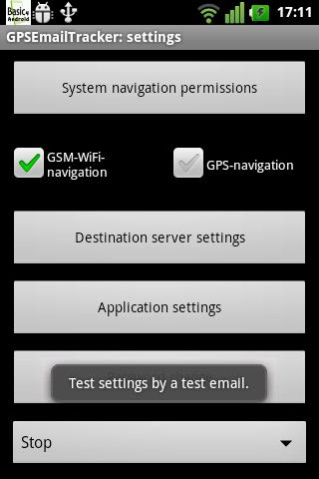
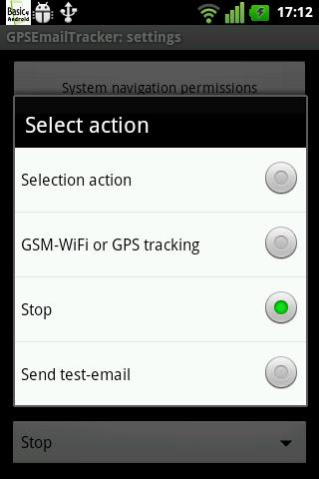

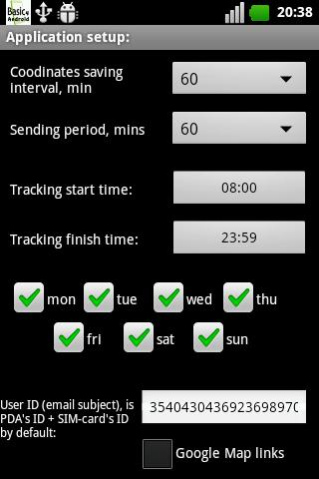
GSM\WiFi and GPS tracker sending reports via SMTP-server to email:
* background service, autostarting after PDA reboot
* while no GPS satellites connection available the app gets rough coordinates from mobile GSM network, 100 - 200 meters accuracy, but no extra power supply needed
* gets precise GPS coordinates, if satellites are connected
* send reports periodically only via a SMTP server to your Email: no any 3rd-party tracking server and your data publication
* at losing Internet connection - GPS coordinates are being stored and to be sent together later when connection is available
* emailing if navigation is disabled by the user
* working by the schedule only: within the hours of chosen work days
Simple and reliable way to know where are your staff, family, goods were and are.
Customization for your business can be easly ordered.
NOTE:
1. setup the schedule carefully and allow system's navigation to make sure that navigation can work. Internet connection is also required.
2. "track" of the points can wobble, if some points are got by GSM-triangulation at the moment when GPS connection was unavailable
3. A-GPS (assisted GPS) device requires an Internet connection not only to send emails, but to collect GPS coordinates.
4. Light version: min reporting interval is 60 minutes.
About GpsEmailTracker Light
The company that develops GpsEmailTracker Light is Peacemakerv. The latest version released by its developer is 0.66f.
To install GpsEmailTracker Light on your Android device, just click the green Continue To App button above to start the installation process. The app is listed on our website since 2012-03-18 and was downloaded 0 times. We have already checked if the download link is safe, however for your own protection we recommend that you scan the downloaded app with your antivirus. Your antivirus may detect the GpsEmailTracker Light as malware as malware if the download link to peacemaker.gpsemailtrackerfree is broken.
How to install GpsEmailTracker Light on your Android device:
- Click on the Continue To App button on our website. This will redirect you to Google Play.
- Once the GpsEmailTracker Light is shown in the Google Play listing of your Android device, you can start its download and installation. Tap on the Install button located below the search bar and to the right of the app icon.
- A pop-up window with the permissions required by GpsEmailTracker Light will be shown. Click on Accept to continue the process.
- GpsEmailTracker Light will be downloaded onto your device, displaying a progress. Once the download completes, the installation will start and you'll get a notification after the installation is finished.
Program Details
System requirements
Download information
Pricing
Version History
version 0.66free
posted on 2012-03-18
v.0.66free:,* added: report at start,* added: passwords (for settings and of SMTP-server) are stored encripted (if forgotten - re-installation only is possible),* added: Google Map links option in email reports,* fixed: speed digit is rounded and in km per hour (if GSM-triangulation used - speed might be always zero)
Disclaimer
External Download
We do not host GpsEmailTracker Light on our servers. We did not scan it for viruses, adware, spyware or other type of malware. This app is hosted by Galad and passed their terms and conditions to be listed there. We recommend caution when installing it.
The APK Download link for GpsEmailTracker Light is provided to you by apps112.com without any warranties, representations or guarantees of any kind, so access it at your own risk.
If you have questions regarding this particular app contact the publisher directly. For questions about the functionalities of apps112.com contact us.
